Search This Blog

Showing posts with label BJIB3143. Show all posts

Tuesday, November 06, 2012

Postponement of Lectures


6 NOVEMBER  2012 / 21 ZULHIJAH 1433H
=================================

"UUM : UNIVERSITI PENGURUSAN TERKEMUKA"
(THE EMINENT MANAGEMENT UNIVERSITY)


To all lecturers and students,
Universiti Utara Malaysia

POSTPONEMENT OF LECTURES IN VIEW OF THE CELEBRATION OF DEEPAVALI ON 13 NOVEMBER 2012 (TUESDAY) AND OF AWAL MUHARRAM ON 15 NOVEMBER 2012 (THURSDAY)

JHEA ONLINEThis is to announce that the Department of Higher Education, Ministry of Higher Education, has requested that all Public Institutions of Higher Learning make the requisite adjustments to the teaching schedule so as to avoid any disruption that may occur because of the close proximity of the holidays for the celebration of Deepavali and Awal Muharram, which fall on 13 November (Tuesday) and 15 November (Thursday) 2012, respectively.

In this regard, the university management has agreed that all Teaching and Learning (T&L) activities on 12 November 2012 (Monday) and 14 November 2012 (Wednesday) be postponed.

The kind cooperation and consideration of all the teaching staff will be very much appreciated.

For enquiries and further information, please call 04-928 3113/3172.

Thank you.

===============================
FROM:
DIRECTOR
ACADEMIC AFFAIRS DEPARTMENT
UNIVERSITI UTARA MALAYSIA

Saturday, September 08, 2012

New Semester... bring on A121!!!

In the spirit of the new semester, I would like to share my schedule with you all, in hope that the first week of class would see one or two students attending... unlike last semester A112... if you really want to know what happened last semester, there is a blog entry here somewhere...

Here's the schedule!


If you don't understand it, sorry, no time for explanations. You either get it or you don't. ;-)

Saturday, April 14, 2012

Class? What Class? BJIB3143

On the 19th and 20th of February, I had a nice surprise when I went to class for the first time that semester. It was the start of a brand new semester and I had done my preparations for class. All hyped up, and ready to go, but when I arrived, the following was what greeted me. I sure hope this does not happen when students return to class after the mid-semester break this tomorrow, the 15th of April 2012. ;-)


Me by my lonesome self... luckily I have perfected the self-photo technique!
 Brand new slides...
 ... at an angle.
What a silent class... hehehe... never mind. This was all due a technicality, whereby the system accidentally dropped everyone from class, so the students were not aware of their actual timetables for the first week. Oh well... like I said, please do not happen again tomorrow... >.<

Thursday, March 15, 2012

BJIB3143: FAQ Part 1

Today's class had many students asking the same questions via email and FB. So I decided to do a small FAQ which hopefully would answer your questions before you even ask.

Q1. "Sir, do we need to prepare the product before publishing the blog? What if someone calls?"
A1. You need to view this assignment from one of two perspectives. 
Perspective 1: view it as just getting marks, so the information, the products, the graphics, and the ENTIRE blog would be 100% fabricated or fiction. It would be just believable as an e-commerce website with or without the actual product being in your possession. However, if you take the second perspective...
Perspective 2: view it as a possible business or side-income. I would recommend you do extra work, such as sourcing out suppliers, calculating appropriate prices for an acceptable profit, establishing logistics, and other matters in order to run it as a business. The more effort and care you put into planning it, the greater the chance for you to maintain the 'assignment' long after you graduate.

Q2. "Is the assignment for Group A only?"
A2. No, the assignment is for ALL groups, namely A, B, and C. I made a mistake in the assignment sheet.

Q3. "Would it be okay if we say in the blog that it is an assignment?"
A3. Yes, I would recommend it. You can always indicate something like: "DISCLAIMER: THIS BLOG IS 100% FICTION AND WAS LAUNCHED FOR ACADEMIC PURPOSES ONLY. PLEASE DO NOT MAKE ANY QUERIES OR PURCHASES". Alternatively you can put in a fictitious phone number and email so that you would not be bothered by all the attention. 

Q4. "How to submit the blog as hardcopy?"
A4. At first I said not to worry, and just submit your 10-page report on the product analysis. However, I just realised that I need your blog as evidence for the SETARA process. Therefore, I need you to "print-screen" or screen capture your blog (yes, ALL the pages if possible) and save it in a Word document. Two screens per page would be suffice. So, for hardcopy submission, this course requires
1. Product analysis report
2. Blog screen-shots

Q5. "What happens if we send email without the proper subject title like you specified in the assignment sheet?"
A5. Please take note here. I will be using an automatic filtering software which well process your emails to get the URL from each email. Therefore, there is no room for error. You need to use the EXACT subject title, which is “BJIB3143: Task 1 <matric. no.>”... for example, if I were to submit an assignment, I would put 
BJIB3143: Task 1 93101
as my subject. Then I would put the URL in the body, for example 
http://zulhumadi.blogspot.com
Please note that I would not put in any extra information or messages.

That is all for now, I will continue with more FAQs as more questions arise.

Sunday, February 26, 2012

LearningZone tips

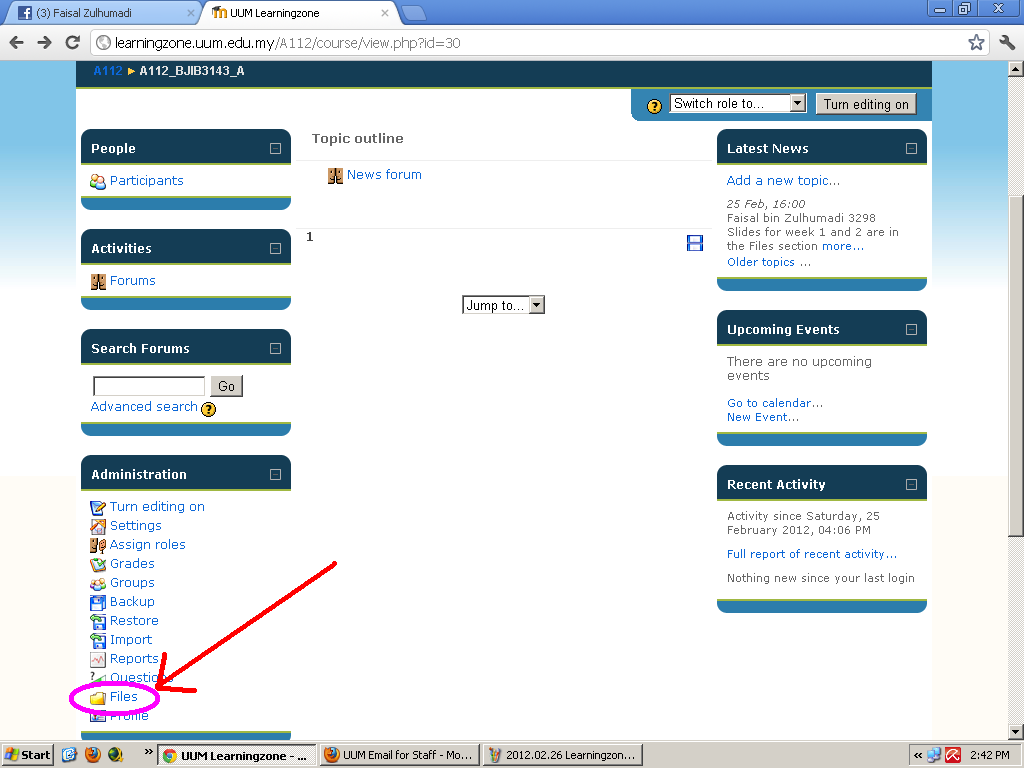
Some of my students have complained that they cannot access the slides that I put online... so here are the steps for accessing them. Please note that I do not know how your interface looks like, so if it is completely different, and you cannot access the slides, then do a ScreenShot and send it to me. Otherwise, follow the guideline below:

1. Go to your subject (in my case, BJIB3143 E-Commerce). Scroll down until you see the "Files" link. Click on this (as shown below).


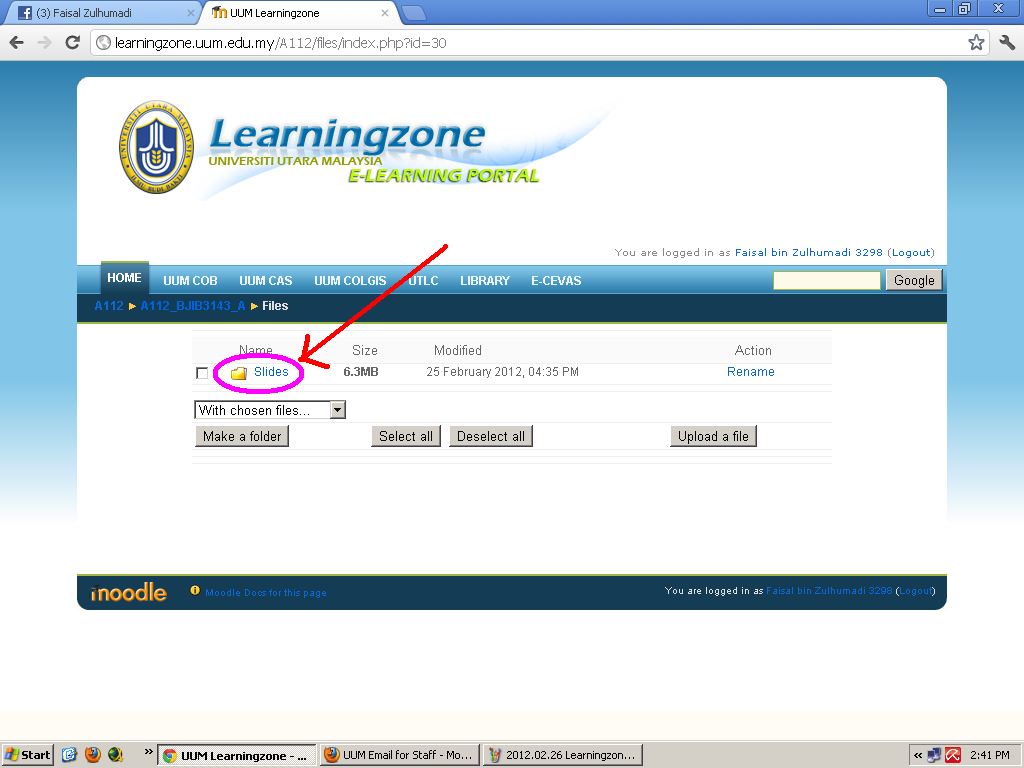
2. The following screen should show a "Slides" folder. Click on this...


3. ... now you should be given a list of slides to download. Click or right-click and save.

If you can't view the picture properly, click on it... it should enlarge.

If problems persist... contact me! :-D

Saturday, February 25, 2012

A112 BJIB3143 Week 1 & 2

Our first 2 slides have been uploaded to http://learningzone.uum.edu.my
Please login and download before our classes for this week.

Friday, February 24, 2012

ZenCart installation steps #2

Part 2... but again, with the disclaimer: Please note that the copyright does not belong to me, it all belongs to the respective parties. I'm just giving some guidelines for my students to be able to complete their project... because this semester, after going through several meetings regarding our curriculum... I may have to eliminate the option of a business proposal... and force them to create an e-commerce website for their group project!!! Of course, it is not finalised yet, so I will let you know when I myself find out the final verdict. Until then, just continue to follow these instructions:
[Also, a majorly BIG thanks and appreciation for my good buddy Imran for creating these guidelines]


 For part 6) and 7).... hehehee.... go figure it out for yourself... there is plenty of online tutorials that show how to modify the pages. Good luck! :D

Thursday, February 23, 2012

ZenCart installation steps #1

I'm repeating this disclaimer for the benefit of my students: Please note that the copyright does not belong to me, it all belongs to the respective parties. I'm just giving some guidelines for my students to be able to complete their project... because this semester, after going through several meetings regarding our curriculum... I may have to eliminate the option of a business proposal... and force them to create an e-commerce website for their group project!!! Of course, it is not finalised yet, so I will let you know when I myself find out the final verdict. Until then, just follow the instructions:
[Also, a majorly BIG thanks and appreciation for my good buddy Imran for creating these guidelines]


Tuesday, February 21, 2012

EasyPHP installation steps

Please note that the copyright does not belong to me, it all belongs to the respective parties. I'm just giving some guidelines for my students to be able to complete their project... because this semester, after going through several meetings regarding our curriculum... I may have to eliminate the option of a business proposal... and force them to create an e-commerce website for their group project!!! Of course, it is not finalised yet, so I will let you know when I myself find out the final verdict. Until then, just follow the instructions:
[Also, a majorly BIG thanks and appreciation for my good buddy Imran for creating these guidelines]


Ok, stay tuned for the next update: How to install ZenCart! :-D

Wednesday, February 08, 2012

A112 Teaching Load

The following is a copy-and-paste of my tentative teaching schedule for Semester A112:


1
BJIB3143ELEKTRONIK DAGANGA

IK8:00 -  9:30AMDKG 6/2
En Faisal Zulhumadi 
2
BJIB3143ELEKTRONIK DAGANGB

AR9:30 - 11:00AMDKG 6/16
En Faisal Zulhumadi 
3
BJIB3143ELEKTRONIK DAGANGC

IK11:00 - 12:30PMDP B.3
En Faisal Zulhumadi 


All you students that are planning to add subjects please do so as soon as possible. There are three groups (A, B, C) but some are filling up quite fast! Please note that this is a tentative programme that has not been finalised yet. I will keep you informed. Thanks

Saturday, January 07, 2012

BJIB3143 Slaid E-dagang / E-commerce Slides

Time to put everything online... for my own personal use, as well as you (currently reading this blog). Starting up with my teaching materials... and then probably to some other stuff.

DISCLAIMER: All these materials are for my own personal use only, as well as those I authorise and give consent.

"Sir, how to download?"

Follow these simple steps:
1. Click on one of the links below, you will be taken to the hosting website:


2. If you do not have a premium account with this website, click on the "REGULAR DOWNLOAD" button to get the next screen:


3. Wait 15 seconds (or more if you have downloaded recently using the same IP address). Please note, if you are downloading from UUM, and someone else is downloading at the same time, you will NOT BE ABLE to download. In this case, wait for an hour and try again. After the waiting time has finished, you will get this screen:


4. Enter the letters to complete the Capcha step and you will finally end up at the following screen:


5. errr... follow the above instruction... :-P

With ALL that out of the way, I'm guessing you are my currently enrolled student in my class, so download away!

Week 1 & 2: